Scoring Types
Several scoring types are available when authoring items.

Partial Scoring for Autoscored Items
For item types that have multiple correct choices, you can set up partial scoring. These item types support partial scoring: choice, gap match, graphic gap match, hot spot, hot text, inline choice, match, tabular match and associate.
The following instructions are for setting up partial scoring for a choice item, but the same principles apply for other autoscored item types.
To set up partial scoring:
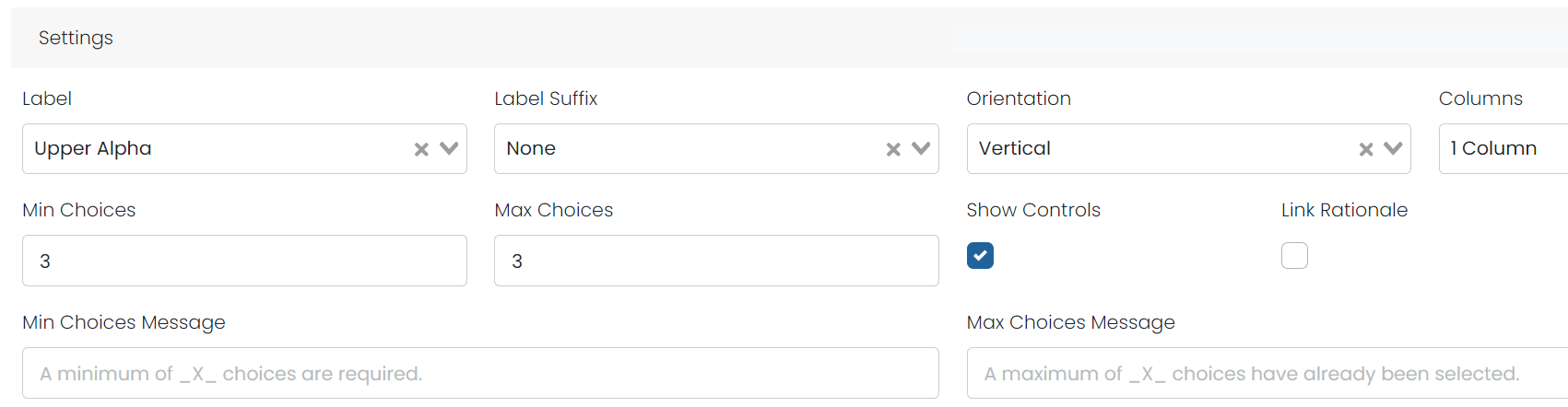
- In the Edit mode for a choice item, in the Settings section enter a number in Max Choices greater than 1 to allow the section of multiple correct answers. You can optionally change the messages student will receive.
- Under Scoring, select ‘Partial Scoring.’
- Complete the partial scoring to show the points for each correct answer. If you want these items to have the same weight as other items on an assessment that are worth one point, you may wish to make the values add up to one point if all correct answers are selected. For example:
- If there are two correct responses, each is worth .5 points.
- If there are three correct responses, the first two are worth .33 and the last is worth .34 points.
- If there are four correct responses, all are worth .25 points.
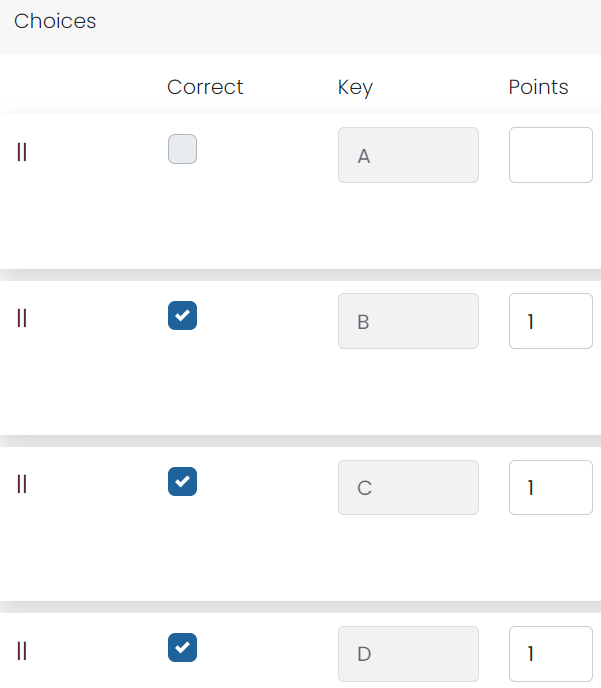
- After the partial points have been entered, select Save.
- Select the Preview tab.
- Select each correct answer checking the points to make sure that the points are correct and then all the correct answers to make sure that the item total score is as expected; modify as needed by returning to the Editor tab.
Dependent (EBSR) Scoring Type
In dependent scoring, the score taken from each question depends on the scores of previous questions on the Item. The rule is that if a question on the Item is not fully correct, the user is not awarded a score for any subsequent questions on the item. For instance, the first question has to be answered correctly because the following one is based on how the student got to the right solution. This scoring type can be used to emulate an Evidence-Based Selected Response (EBSR) Item type.
Dichotomous Scoring Type
Dichotomously scored Items have only two possible outcomes: fully correct or fully incorrect. If the user's score for every part on the item is fully correct, the score for the item is calculated by adding the max scores from each part. If any part of the item is not fully correct, the score is zero.
GTE Half and Full Scoring Type
The GTE Half and Full scoring type gives students partial credit (half points) if they select half or more of the correct answers on both single-part and multi-part items. Example: For a 2-point question with 5 choices and 3 correct answers the student will now receive 0 points for 1 correct answer, 1 point for 2 correct answers (half or more correct), and 2 points for all 3 correct answers. Example: For a 3-part question worth 2 points the student will receive 0 points for 1 correct part, 1 point for 2 correct parts, and 2 points for all 3 correct parts. This scoring type applies to all machine scored interactions.
Partial-All But One Correct Scoring Type
With this scoring type, you can set up scoring on items so a student receives partial credit (half of the max score for the item) if they answer all but one correct answer. Example: A multi-select multiple choice item worth 2 points and 5 choices with 4 correct answers the student will now receive a 0 when they select only one correct answer, a 0 when they select the second correct answer, 1 when they select the third correct answer, and 2 when they select the fourth (all correct) answers. This scoring type applies to all machine scored interactions.
Custom Response Processing Scoring Type
The Custom Response Processing scoring type preserves custom QTI response processing elements when regenerating QTI XML. This allows users to maintain hand-crafted response processing logic that isn't covered by the standard scoring types.
Tiny Link: https://support.assessment.pearson.com/x/NQEnC