
...
| Expand | ||
|---|---|---|
| ||
| ||
| Note | ||
|
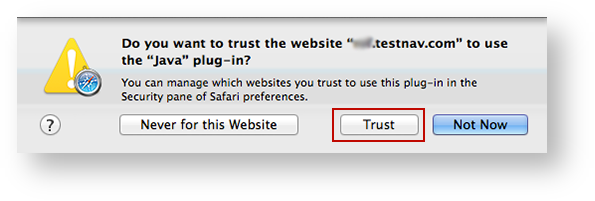
TestNav must run in unsafe mode in Safari. After you trust your secure test website to use Java (as shown above):
- Click Safari > Preferences...
Click the Security tab, click Manage Website Settings... (If the button is disabled, select Allow Plug-ins to enable it.)
Expand title Click here to view a screenshot... 
- Scroll through the plug-ins on the left side of the window, and click Java. Your secure test website should appear in the Configured Websites field.
Click the drop down on the right of your website, and select Run in Unsafe Mode. Then, click Done.
Expand title Click here to view a screenshot... 
You may also see one of the following notifications depending on which Safari version you use.
...