...
| Include Page |
|---|
| IR:_TN_Expand |
|---|
| IR:_TN_Expand |
|---|
|
These ordered steps correspond to sections below or a related setup page. You can click each link to go directly to the corresponding processes.
...
| Include Page |
|---|
| IR:_TN_Java_SetUpJavaSetUp |
|---|
| IR:_TN_Java_SetUpJavaSetUp |
|---|
|
| Include Page |
|---|
| IR:_TN_Java_JavaFFFirefox |
|---|
| IR:_TN_Java_JavaFFFirefox |
|---|
|
| Include Page |
|---|
| IR:_TN_EnablePopups_FFEnablePopupsFirefox |
|---|
| IR:_TN_FFEnablePopupsEnablePopups_Firefox |
|---|
|
Safari
If a notification appears asking you whether to trust your secure test website to use Java, click Trust.
...
- Click the Apple icon > System Preferences > Java.
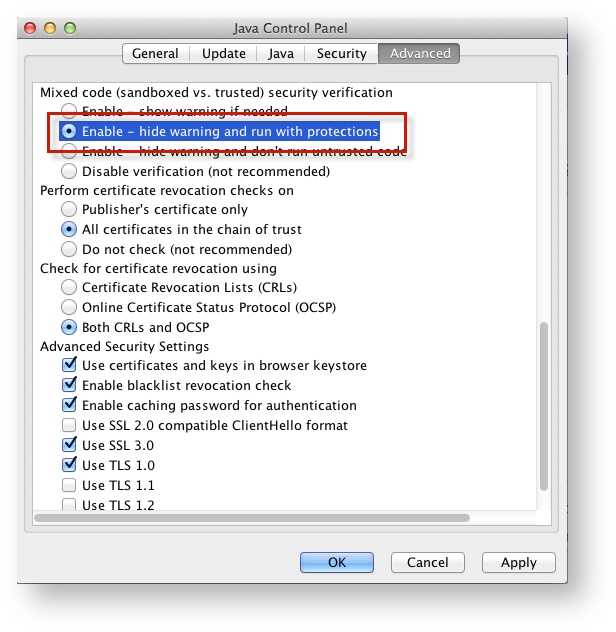
Click Advanced.
Select Enable - hide warning and run with protections:
| Expand |
|---|
| title | Click here to view a screenshot... |
|---|
|
|
...
| Java_DisablePrompt_CloseApps | | IR:_TN_Java_ |
|---|
|
...
| Anchor |
|---|
| systemcheckbb |
|---|
| systemcheckbb |
|---|
|
Run SystemCheck
| Include Page |
|---|
| IR:_TN_systemcheckSystemCheck_browser-basedBB |
|---|
| IR:_TN_systemcheckSystemCheck_browser-basedBB |
|---|
|
Set Up Response File Backups
| Include Page |
|---|
| IR:_TN_SRFandLogs_MacWinLin |
|---|
| IR:_TN_SRFandLogs_MacWinLin |
|---|
|
Default Primary Save Location
...
| Include Page |
|---|
| IR:_TN_SRFLogsSRFandLogs_SecSave |
|---|
| IR:_TN_SRFLogsSRFandLogs_SecSave |
|---|
|
| Include Page |
|---|
| IR:_TN_TrialInfrastructureTrial |
|---|
| IR:_TN_TrialInfrastructureTrial |
|---|
|
Related Information
You can learn more about SRF and log files on the following pages:
| Include Page |
|---|
| IR:_TN_SRFandLogs_RelatedInfoBB |
|---|
| IR:_TN_SRFandLogs_RelatedInfoBB |
|---|
|
...
