
...
- Select Rubric Setup in the Setup/Configuration menu (left hand navigation).
- Select New Rubric in Click on
 in the top menu bar.,
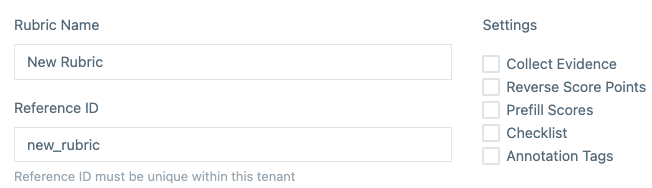
 - Enter a Rubric Name : The
- . This will be the label seen when assigning rubric's
- rubrics to Items
- items.
- Enter Reference ID : This is used
- which will be used when working directly with the API.
- Enter the following Settings:
- Collect Evidence: This adds an additional text field for the scorer to add notes specific to each trait being scored (
...
- versus Text Traits).
- Reverse Score Points: Scores from 1 | 2 | 3 | 4 are reversed to 4 | 3 | 2 | 1.
- Prefill Scores: Sets the default scored value of 1.
- Checklist (text traits only): This adds a checklist to be completed by the scorer.
Trait Setup
There are two types of traits:
- Numeric Traits: Giving Giving scorers the ability to score a response using a range of numbers (from Min to Max), Optional Half Points, Weighting.
- Text Traits: Give Give the scorers an open option for providing a response for the response as a whole. Text Trait types are: Text, Long Text and Text Select.
As traits are added, they are immediately visible on the right side or at the bottom of the screen (depending upon your screen width) as Preview.
...