
...
If all passing requirements are only individual set requirements, no additional settings need to be added and qualification can begin. However, it is also possible to add "Cross-set Requirements" that will create rules for passing that are checked against all qualification sets in addition to the individual set requirements. Use the  button to add a cross-set requirement by choosing an option from the dropdown, completing any additional input, and pressing the
  button OK to save the requirement. Additional Cross-set Requirements can continue to be added in this way until all needed requirements have been added. Any Cross-set Requirements can be edited or deleted as needed.
...
There are two basic types of Cross-set Requirements -- those that apply to the overall scores given on a response and those that apply to scores given on specific traits. When using trait-specific requirements, these can be applied to an individual trait by choosing the specific rubric trait or to all traits on the rubric. Both overall and trait-specific requirements will be calculated against all sets the rater scores, defined as the number of Must See sets.
- Exact Agreement- : Set a threshold percentage for raters to meet by matching the true score for all traits on qualification set responses exactly.
- Trait-Specific Exact Agreement- : Set a threshold percentage for raters to meet by matching the true score on a specific trait(s) exactly.
- Exact/Adjacent Agreement- : The threshold percentage set will be met by achieving an exact or adjacent match to the overall true score on each response.
- Trait-Specific Exact/Adjacent Agreement- : The threshold percentage set will be met by achieving an exact or adjacent match to the specific trait's true score on each response.
- Max Discrepancies- : The total number of non-adjacent overall scores given on each response by the rater that will result in failing qualification.
- Max Discrepancies Per Trait- : The total number of non-adjacent specific trait scores given on each response by the rater that will result in failing qualification.
- Drop a Set- : Remove a set that the rater has seen from the final calculation of all Cross-set Requirements. Choose an option for how the set dropped will be determined. Each option is based on the scores for an individual set.
- Keep Best Trait- : Define a number of sets for a specific trait or all traits where only the highest agreement results will be used to satisfy the cross-set trait-specific agreement requirements. The number of traits kept will always be equal to the number of sets configured on Must Pass. For this option to be used, there must already be a trait-specific rule set.
- Traits Must Pass- Define : Define a number of sets for a specific trait or all traits where the rater must meet the trait-specific agreement threshold rule(s). For this option to be used, there must already be a trait-specific rule set. Note, when using this rule, it will be combined with any trait-specific requirements that refer to the same trait to create 1 rule.
...
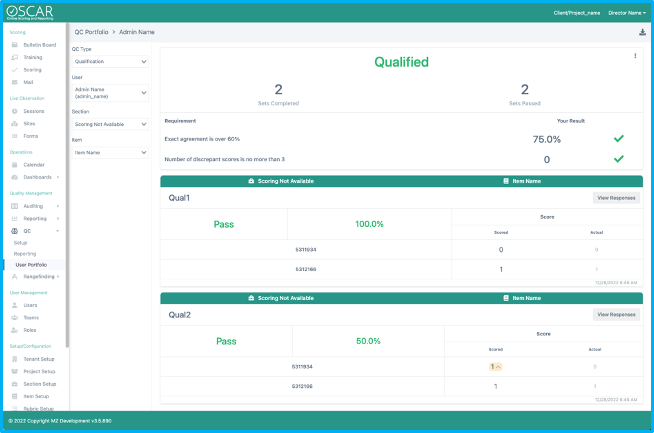
After qualification has begun, results can be viewed from the Qualification Reporting page or the User Portfolio page. The Qualification Reporting page will display results on individual sets as well as overall results on all sets. Use the User Portfolio page to view user qualification progress against Cross-set Requirements. Below is an example report from the User Portfolio page where the rater passed qualification. The item qualification settings were 50% exact agreement on each set, and the Cross-set Requirements are displayed on the page.
...
Tiny Link: : https://support.assessment.pearson.com/x/2IC4D