
Data files and fields vary by program.
This page provides high-level descriptions of data files .that you can import and export. When you import a file:
- You
- Depending on your program, data files and fields may vary.
- When you have imported a file, the subsequent imports will override existing data or create new records.
Include Page _PAsup_IgnoreErrorThreshold _PAsup_IgnoreErrorThreshold When a file is imported, you can notify other users by using the Additional e-mails option. You can use Additional emails option to notify other users of the import.
...
| File Name |
|---|
| File contains... | File Type | Options for Import Files | Options for Export Files | ||||||
|---|---|---|---|---|---|---|---|---|---|
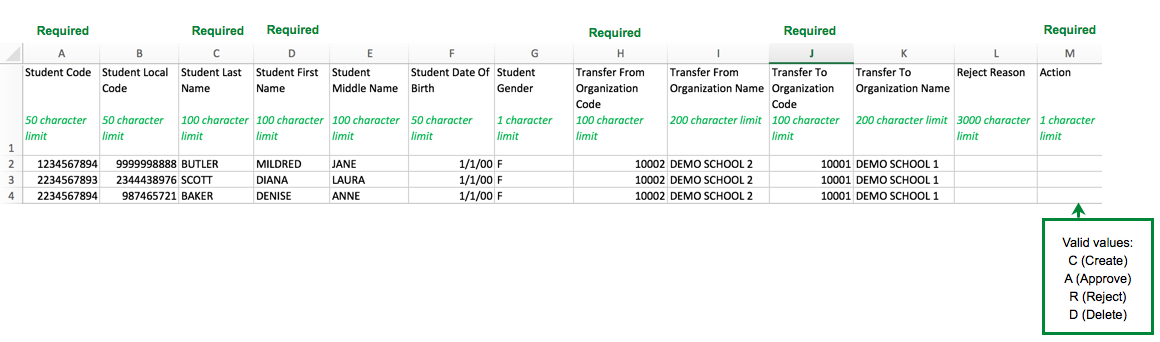
| Enrollment Transfer Import/Export | Enrollment transfer lists that include student details and names of the organizations to which a student is being transferred to and from.
Download an Enrollment Transfer File Layout.csv. | Fixed/CSV |
| ||||||
Empty Session Export Empty Session Delete Import | Use Empty Session Export to download a file of sessions without student tests. You can then review the file and update accordingly, and then import with Empty Session Delete Import to clean up the data without needing to manually delete within the UI. Fields required for the Import are the Organization Code, Session Name and Test Name. | Fixed/CSV |
| ||||||
| Form Sampling Import/Export |
| Use this file to define "Form Sampling" plans. Sampling plans can be used to make sure that items on a specific form are seen by, and responses are collected from, students from various organizational entities | Fixed/CSV |
| |
Organization Import/Export | Organization-specific information. You should not update this information during a test administration. |
| Fixed/CSV |
|
|
| Organization Participation Import/Export |
Organization-specific information, including test administration participation and enrollment counts. |
| Fixed/CSV |
|
| Enrollment counts |
refer to the number of students who will |
take the test. You can view the enrollment counts used for initial orders (based on the student registration) by locking the enrollment count numbers. To export data, you can select from the following options:
|
| Personal Needs Profile (PNP) Import/Export |
Accommodations for both paper and online testing. However, only the online testing attributes |
are passed to TestNav. Some accommodations |
determine the forms assigned to the student. |
|
| Based on the selected test criteria, you can select how you want to export data. You |
export by students with test assignments or by students currently testing. Additionally, you can select tests |
that should not be scored. To export data, you can select from the following options:
| ||||
PreID Import/Export | PreID barcodes for students. |
| To export data, select Export Begin Date. | |
Registration Reporting Groups Import/Export | Student registration details for reporting groups. |
| ||
Session Create/Move Export Session Create/Move Import | Session Create/Move allows the creation of sessions, adding students to sessions, and moving students from session to session. | Fixed/CSV | Export - Include: All student tests (standalone standard, non-strict battery unit, and parent strict battery tests) for the context organization
| |
Student Test Reporting Groups Import/Export | Student test reporting groups information. |
| To export data, you can select from the following options:
| |
| Student Import/Export |
Student information. |
You should not update this information during a test administration. If your program uses permanent and temporary student categories:
|
|
| ||
Student Delete Import | A list of student records that you must delete from the system. You cannot delete a student record if the student test has an In Progress or Completed status. | Fixed/CSV |
|
| |
| Student Registration Delete |
Student registration and test data. It may also include student primary demographic data, if student data does not have to be managed separately from the registration and student test data. |
The system cannot delete data from existing completed student tests |
. |
|
|
|
| Student Registration Import/Export |
Student registration and test data. It may also include student primary demographic data, if student data |
is not |
managed separately from the registration and student test data. | Fixed/CSV (only for export) |
|
| You can export data based on students with test assignments or by students who are currently testing. Test Status Filters: Assign, Testing, Attempts |
Student Test Update Import/Export |
Mass post-test updates for completed student tests. |
| Fixed/CSV |
|
| You can export data based on student test participation criteria, such as: |
|
|
|
To export data, you can select from the following options:
|
User Import/Export |
| User information, authorized organizations, role assignments, and account active dates. |
|
...
| To include deleted users in a user file export, select Include Deleted Users. | |||
User Reporting Groups Import/Export | Information of reporting group users. |
|