
...
The System Requirements section includes:
- TestNav 8.3 for customers taking the 8.3 release. The TestNav 8.3
- requirements page contains three sections:
- Hardware Requirements
- Browser-based Software Requirements Installable App Software Requirements
- TestNav 8.2
- ProctorCache requirements
The requirements in this section reflect TestNav minimum requirements; however, some customers slightly vary requirements for their specific organizations. Requirements also vary slightly by version.
...
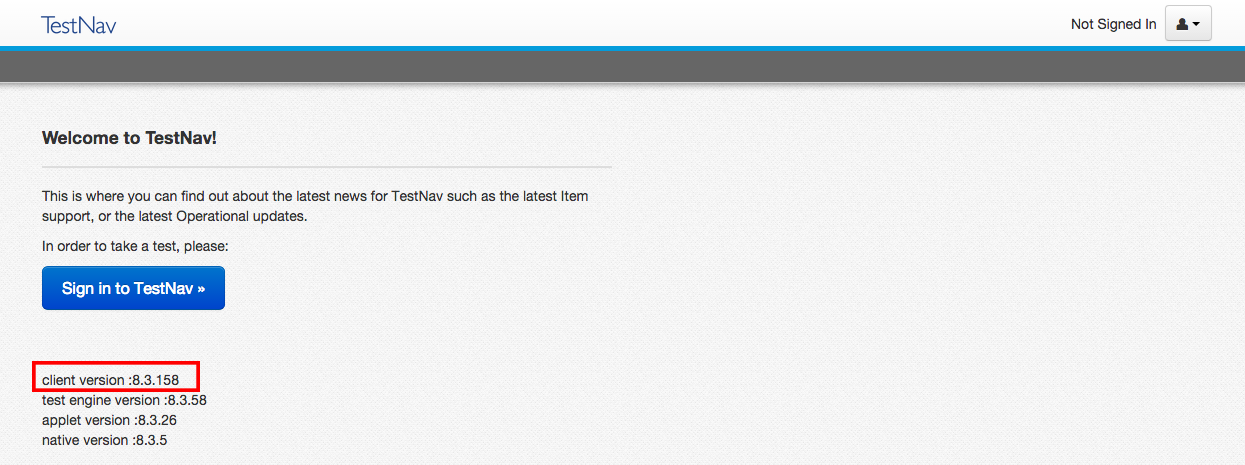
Under the blue Sign In to TestNav button, you see version information. The first two digits of the client version indicate your TestNav version.
Click the image below to enlarge:.

Installable TestNav Apps
...
After you install TestNav from the app store, it should automatically updateyou can find your release version and update your release version using the following instructions.
| Expand | ||
|---|---|---|
| ||
|
...