 Technical Bulletin
Published: April , 2022
What is happening?
To avoid any interruptions during sign in, Pearson advises customers to disable all applications, and then run App Check, before students attempt to sign in.
What does this mean?
Disable all applications on testing devices prior to testing and run App Check to ensure that all apps have been disabled.
TestNav will display an error if a device is running an application when a student attempts to sign in.
What do I need to do (and how do I do it)?
Before a test session begins:
- Disable applications on each testing device.
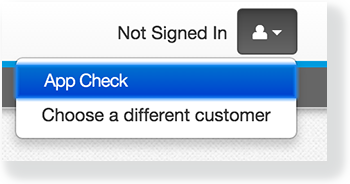
- Go to the user dropdown and select App Check.
- TestNav displays green checkboxes for Kiosk Mode readiness and connectivity to TestNav, if the system passes.
If an application is running in the background, TestNav displays a fail message and advises you to disable the specific application before running App Check again.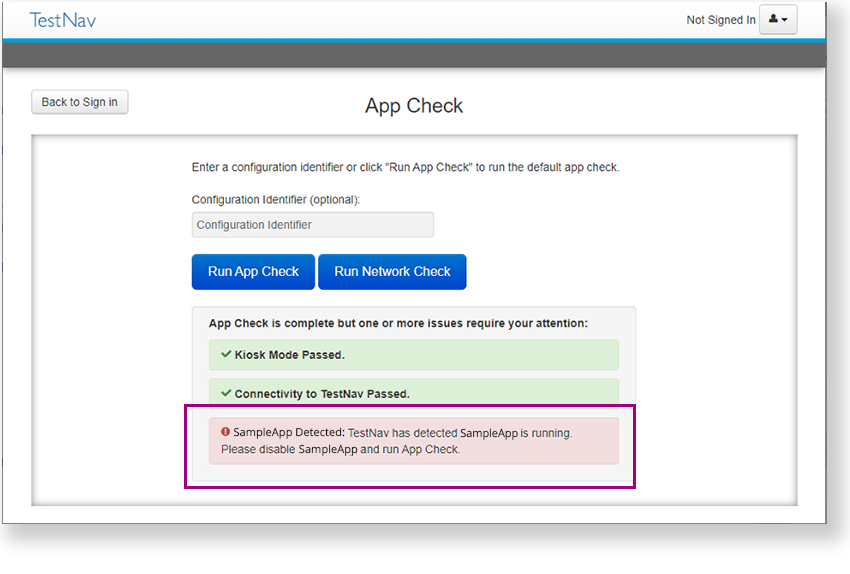
- Disable the application and run App Check again.
If a student attempts to sign in while an application is running, and TestNav displays an error:
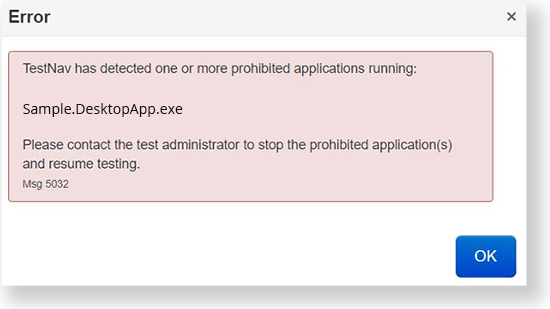
- Disable the application on that device.
- Run App Check.
- Resume the student's test session.
- Ask the student to sign in again.
Contact your Pearson Technology Engagement Manager (TEM) with any questions regarding the update.