Updating your username and password can be done quickly by editing your profile.
- Go to the OSCAR home page and complete the steps to log in.
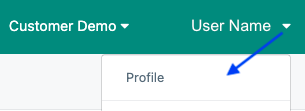
- Select your name in the upper right corner and select Profile from the User Name menu.
- Update the information you want to change.
- Select Save.
Tiny Link: https://support.assessment.pearson.com/x/fYCwCg