Configuring Metadata Reliability
Navigation: Setup/Config> Item Setup> Edit Item> Scoring Setup
Metadata is information that may be stored in a response when it is loaded to OSCAR using our Response API or added to responses via Auditing. Metadata may represent information about where the response was created, like the school, or other information about the response like a test-taker's id. This information is stored in the OSCAR database with the response and can be used to determine which responses will be flagged for a second read.
Metadata Keys
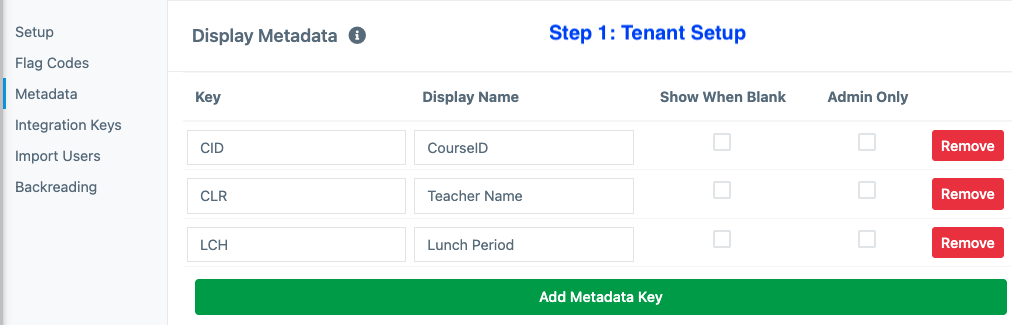
To begin using Metadata Reliability, the metadata key that will be used should be saved in OSCAR. To do this, go to Tenant Setup and save the exact text of the metadata key using the Add Metadata Key button.
The screenshot below is an example where three metadata keys were added to the tenant. Note, once added, the metadata values will be displayed during scoring unless the Admin Only option is selected. If selected, only users with the role permission for View Admin Metadata enabled will able to see the associated metadata while Scoring. Additionally, metadata associated with the added key will be able to be viewed on the Auditing page.
Metadata Reliability
Once a metadata key exists, it can be used for determining reliability by enabling this feature in Item Setup. Reliability controls what percent of the responses will require a second read. The specific responses chosen for reliability will be randomly determined as responses are loaded, based on the Reliability percentage set.
Configuring and enabling the Metadata Reliability feature will ensure ONLY responses with the chosen Metadata Key will be selected for reliability. Responses will still be marked for reliability when they are loaded into OSCAR and will still be randomly selected from the available responses with the chosen Metadata Key. However, the reliability percentage will only apply to each unique value associated with the key. For example, a metadata value of the key "CourseID" might be "101." When selecting responses for reliability, OSCAR will apply the reliability percentage to each unique value. Therefore, if the reliability percentage is set to 20%, 20% of the responses that have a CourseID value of "101" would be selected for reliability, and 20% of the responses that have a value of "102" would be selected for reliability, ...and so on. 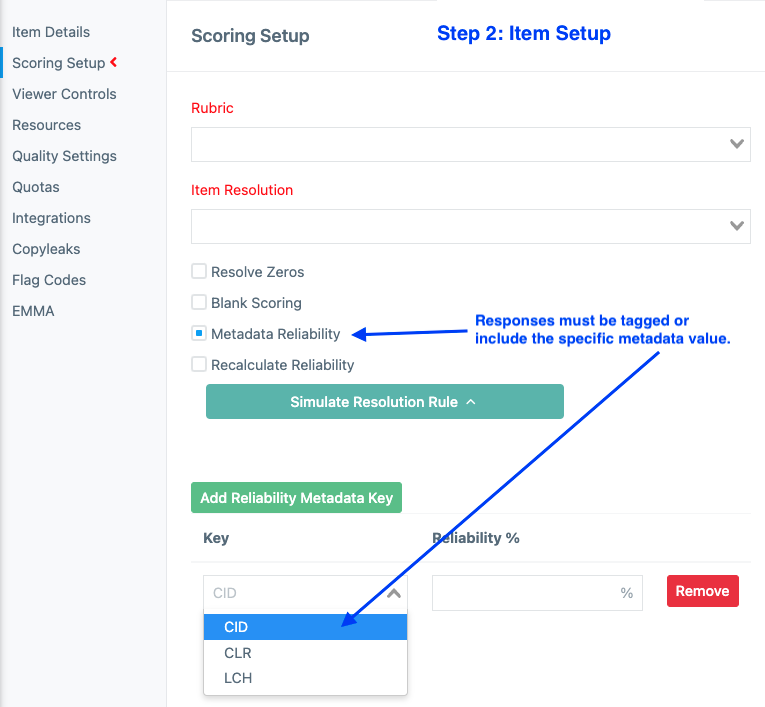
Important notes to consider for Metadata Reliability:
- Only one metadata key can be used for selecting reliability. This key can contain any number of unique values.
- Saved metadata keys will display the metadata value during scoring unless the Admin Only option is selected.
- Responses that do not contain the specified metadata key will be ignored for reliability when using this setting.
- Responses will only be marked for reliability when loaded. Use the Recalculate Reliability feature to update which responses are marked if this setting is applied after responses have been loaded and to change the percentage of responses marked for reliability, if a different reliability percentage had already been saved.