
-
Created by
 user-760ba, last updated on Jul 29, 2024
3 minute read
user-760ba, last updated on Jul 29, 2024
3 minute read
Many tools are available at the
| Tool | Item | Section | Form |
|---|---|---|---|
| Flag Item (Bookmark | Y | ||
| Choice Eliminator | Y | ||
| Choice Masking | Y | ||
| Notepad | Y | ||
| Line Reader | Y | ||
| Line Reader Mask | Y | ||
| Magnifier | Y | ||
| Color Contrast | Y | ||
| Dictionary | Y | ||
| Highlighter | Y | ||
· Flag Item (Bookmark): The tester can flag items they would like a reminder to revisit. Flagged items are shown on the review screens.\
· Choice Eliminator: This tool partially covers an option with a gray striped screen and can be turned on and off by clicking each option choice. This setting can be used with the choice masking tool.
· Choice Masking: This tool completely covers all options with a solid screen and can be turned on and off by clicking the eyeball next to each option. Masking will change color to match any color contrast settings. This setting can be used with the choice eliminator tool.
· Notepad: The tester has access to a notepad. The notepad is cleared between sections.
· Line Reader: This tool partially grays out the entire screen except the line the tester is currently reading. This is a strategy to eliminate some "noise" by allowing the tester to focus on one line of text at a time. The tester manually moves the line reader to read new lines of text.
· Line Reader Mask: The tester can completely cover the area around the content they are currently reading. This is a strategy to eliminate all "noise" by allowing the tester to focus on one line of text at a time. The tester manually moves the line reader mask to read new lines of text and can change the mask and display window size as needed.
· Magnifier: Enable to allow the student to enlarge specific areas of the screen during a test. Once activated, users can move the tool around, enlarge the tool and change the magnification. Allowed magnification is 150% to 400% in 50% intervals.
· Color Contrast: The tester can modify the color palette to create either more or less contrast between the font color and background color. There are eight different color schemes to choose from. This is a strategy to make the text easier for the tester to interpret.
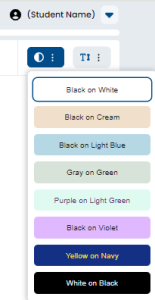
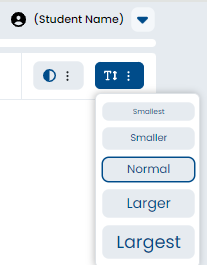
· Font Size: The tester can modify the font size of text only. This does not affect images or other design elements.
· Dictionary: The tester can select a single word and have a dictionary entry appear to help with understanding.
· Highlighter: The tester can highlight text in the content and change the background color by setting a highlight color. This allows the tester to set highlight reminders within the content.
·
Tiny Link: