
-
Created by
 user-6d962, last updated on Aug 25, 2015
2 minute read
user-6d962, last updated on Aug 25, 2015
2 minute read
Unable to render {include} The included page could not be found.
Unable to render {include} The included page could not be found.
Unable to render {include} The included page could not be found.
Safari
If the notification below appears when you launch TestNav or TestNav SystemCheck, click Trust.

You may also see one of the following notifications depending on which Safari version you use.
If you see the Security Warning notification:
- Select the Do not show this again for this app and web site check box.
This ensures that the warning screen will not appear again. - Click Allow to continue to TestNav and TestNav SystemCheck.
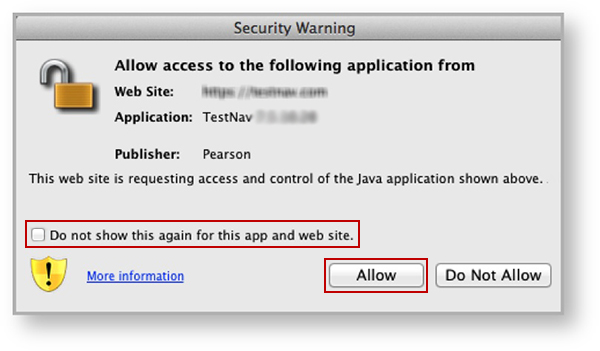
If you see the notification below:
- Select the Do not show this again for apps from the publisher and location above check box.
This ensures that the warning screen will not appear again. - Click Run to continue to TestNav and TestNav SystemCheck.

Unable to render {include} The included page could not be found.
Eliminate the Java Prompt When Testing
- Click the Apple icon > System Preferences > Java.
Click Advanced.
Select Enable - hide warning and run with protections:
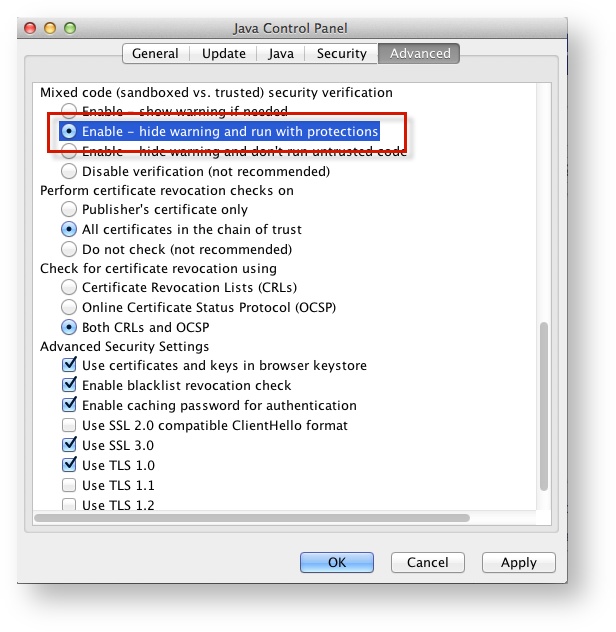
Unable to render {include} The included page could not be found.
Run SystemCheck
Unable to render {include} The included page could not be found.
Set Up Response File Backups
Unable to render {include} The included page could not be found.
Default Primary Save Location
| Operating System | SRF Location | Log File Location |
|---|---|---|
| Mac OS X | Users/username/Pearson/... | /Users/<username>/Pearson/first name-last name-identifier/logs For example: /Users/UserA/Pearson/User-A-1234/logs |
Unable to render {include} The included page could not be found.
Unable to render {include} The included page could not be found.