Setting Item Resolution Rules and Reliability
Navigation: Setup/Configuration > Item Setup > Item Edit > Scoring Setup
Item resolution are the rules that determine how many reads/scores each response will need and what combination of scores will trigger a resolution before a response will be considered Complete. Each item can have its own item resolution rules configured. Item resolution rules in OSCAR are configured in the Setup/Configuration>Item Setup page by hitting the item Edit button and navigating to the Scoring Setup tab. When setting the Item Resolution Type, make sure to use the Simulate Resolution tool to test your item resolution settings and see how they will be applied during scoring.
Reliability %
For all item types that require more than one read for each response, the Reliability % can be set.
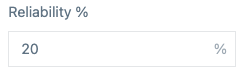
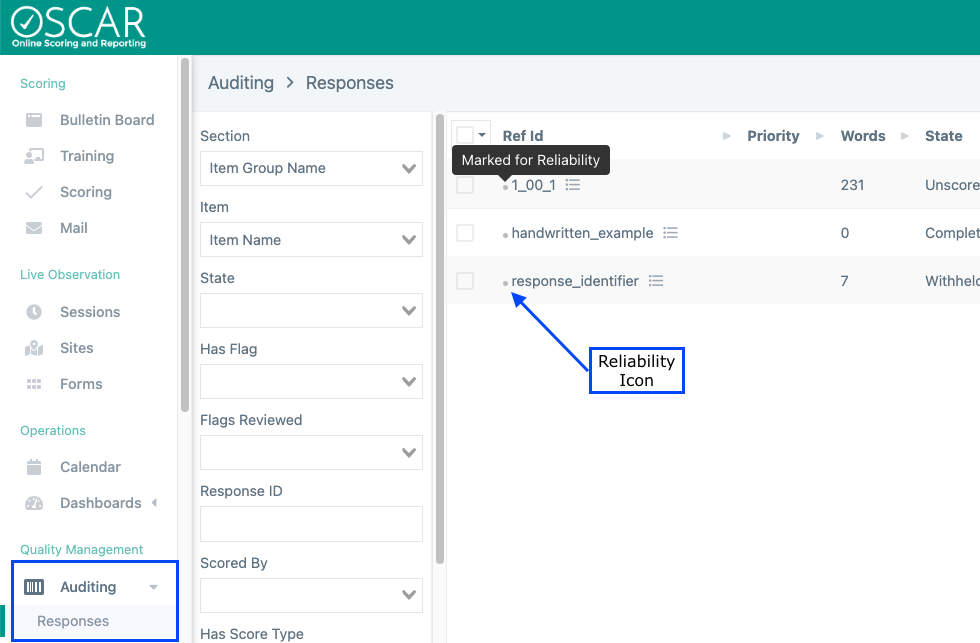
This controls what percent of the responses will require a second read. Responses are chosen randomly for reliability. Creating a Double Score Exact item type with 20% reliability will result in 20% of the responses, selected at random, getting a second read. Of those 20% with two scores, any non-exact scoring matches will require a resolution read in this example. Responses are marked for reliability when responses are loaded into OSCAR. Which responses were chosen for reliability can viewed from the Auditing page; any response with a dot icon next to the response ID will require a reliability score.
To change the reliability percentage on responses that have already been loaded, use the recalculate reliability tool from the Scoring Setup page: 
Item Resolution Types
In OSCAR there a number of different item resolution types that can be chosen. Each item can only have one Item Resolution type selected though this option can be changed later. Once selected, the Item Resolution type will apply to all responses associated with the item.
- Double Scored Exact: The specified percentage of responses will get two scores and go to resolution if any of the trait scores do not match exactly.
- Double Scored Exact/Adjacent: The specified percent of responses will get two scores and if all trait scores are exact or adjacent (meaning within 1 score point), no resolution read will be required. If scores for any trait are non-adjacent, then a resolution read will be required.
- Double Scored Exact/Adjacent, Exact Under 3: The specified percent of responses will get two scores and if scores are exact and under 3 or adjacent (meaning within 1 score point), no resolution read will be required. If scores for any trait are non adjacent or adjacent with a score of 3 or more, then a resolution read will be required.
- Double Scored No Resolution: The specified percent of responses will get two scores and no responses will require resolution scoring to be complete.
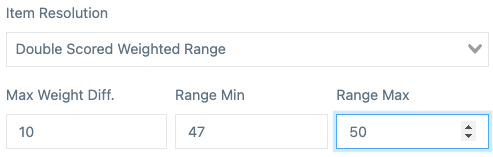
- Double Scored Weighted Range: This setting will allow the user to configure the Max Weight Diff and a min/max range. The specified percent of responses get two scores and responses will go to resolution if any of the following conditions are met.
Any trait is non-adjacent
The difference of the weighted score of the first read and second read differ is equal to or greater than the Max Weight Diff where the weighted score for each read is the sum of each raw score multiplied by the trait weight (the weighting for a trait is configured on the rubric settings). For example, we have 4 traits with weights 3, 2, 3, 2 respectively. The first read has a score of 2 2 2 2, making the weighted score 20 ( 3*2 + 2*2 + 3*2 + 2*2). The second read has a score of 3 3 3 3 or a weighted score of 30 (3*3 + 3*2 + 3*3 + 3*2). The resolution threshold will have to be set to 10 or more for this combination of scores to trigger a resolution read.
The sum of both reads' weighted scores falls within the Range Min and Range Max inclusively. In the above example, the weighted sum would be 50, so a range Min/Max would need to include the value 50 to trigger resolution.
Omaha Scoring Rule: This setting allows more customization in configuring the rules that determine whether a resolution read is required.
- Resolve Min/Max: If Min/Max scores for a domain are selected the response will automatically go to resolution. For example, if trait one has a score range of 1-3 and the first reader selects a score of 1 and the second reader selects a 3, the response will go to resolution as both the minimum trait score AND the maximum trait score were selected for the same response.
- Max Non-adjacent: This setting allows for a threshold to be set for the number of non-adjacent scores that are acceptable. If the number of non-adjacent scores on a response is GREATER than the threshold, the response will go to resolution.
- Max Score Difference: This setting allows for a threshold for max score difference of the total of the trait scores. For example, if the threshold was set at 5 and the first rater assigned 4,4,4,4 and the second rater assigned 3,2,2,2 the total score difference would be 7 which would trigger a resolution read for the response.
- Single Scored: As the name implies, responses will get one score and move to complete.
- Three Reads: This setting requires that all responses receive three reads by unique raters. The third read will still be counted in OSCAR as a resolution read, though it will be scored blindly through the scoring queue.
Note: Once scoring has started on an item you will be able to edit the item scoring type, but this change may not affect previously scored responses. To ensure a new item resolution type is applied to all responses in the item, previously scored responses should be reset and returned to the Unscored state.
Tiny Link: https://support.assessment.pearson.com/x/YoG4D